

Vehicle Assessor System

The system your assessment business runs on.

Configured to how your business works: your forms, your workflow, your report templates. Instructions come in, reports go out, customers stay informed.

10+ years built with assessors and engineersUK · Ireland · Australia · New Zealand Any device Windows, Mac, Linux, Android and iOS

How it works

One job, seen from both sides.

Your customer on the left, in the portal. Your engineer on the right, in VAS. Scroll, and a job travels from the customer's form to the finished report, with every note and notification crossing between them.

01
Portal· 1 of 7

The customer fills in your form.

They open the portal and fill in the form you designed for them: registration, their reference, what happened, photos. Required fields are checked before they can submit.

Instruction providerRequired-field validatorsFile upload
Customer · portalAshford Claims
New instructionCar Inspection
Submit instruction
25/000126New
AB21 VAS📷 14💬 4
Engineer's report.pdf
Notes
Job created · you'll be notified of changes
J. Whitfield · engineerInspection booked Thu 10:00 at your Ashford depot.
YouKeys are with the depot manager.
Inspected · 14 photos added
J. Whitfield · engineerNet estimate £2,236.70 attached for approval.
YouApproved, please proceed.
Your report is ready
Engineer · VASJ. Whitfield
Waiting for work
Notification
Dashboard · nothing new
Waiting for instructions
Description · from the portal

Files · 2 from the customer
VAS · Inspection sheetRev A
Plan view of the vehicle
01
NSF front wingDeformation 42 mm · 3 photos
02
NSF headlampLens cracked · 2 photos
03
NSF front tyreTread 2.9 mm · advisory
Not roadworthy

Safety checks

Seatbelts & airbagsPass
Tyres · NSF 2.9 mmAlert
Lights · NSF headlampFail
Audatex-estimate.pdf

Estimate Importing…

LineEstimatedAgreed
Labour£0.00£0.00
Parts£0.00£0.00
Paint & materials£0.00£0.00
Net£0.00£0.00

External sources pulled into the job

DVLA vehicle enquiryMake, colour, engine, tax status
Volkswagen · 1498 cc
MOT historyLast test and advisories
Pass · exp 14 Mar 2027
Glass's market valuePre-accident value
£8,450
Previous jobs on this vehicleLinked by registration
1 · Aug 2025

Engineer's Report

VehicleVolkswagen Golf
RegistrationAB21 VAS
Instructed byAshford Claims
Findings3 · see sheet
Net estimate£2,236.70
Market value£8,450
PDF · 3 pages · from your .docx template
Job log
  • Report generated from template
  • Emailed to Ashford Claims with the PDF
  • Available in the customer portal
  • Status set to Complete · owner notified

Configured to your business

Not a fixed product you adapt to. A system shaped to the way you already work.

Five things every assessment business does differently, and how VAS bends to each without a line of code from you.

Data capture

Your own forms, groups and fields, with the control types, validators and default values you choose. Lay them out as a grid or as slides for the tablet.

Proof: Around 30 control types, from a text box to a signature pad, a damage diagram and an estimate table.

Workflow

Your job statuses, job types, task types and access groups. One-click job actions that prompt for the missing fields, send the email, set the status and stamp the date.

Proof: Job actions, notification rules per event and recipient, follow-up dates on every job.

Report templates

The Word templates you already use become the report layouts. Any report, letter or invoice, with your logo, your wording and your numbering.

Proof: .docx templates rendered to PDF, merge tags, generated file names and email subjects.

Analytics

Saved job views for the day-to-day, a dashboard of what is due, CSV exports for the month end and an analytics index for the numbers behind the business.

Proof: Saved views with your own columns, exports by date and form, analytics export.

Integrations

Estimate systems, vehicle lookups and sign-in providers out of the box. Every change on a job can be pushed to your automation platform, so accounting and other tools stay in step.

Proof: Audatex, Glassmatix, GT Motive, iBody, DVLA, MOT history, RegCheck; webhooks and n8n automation.

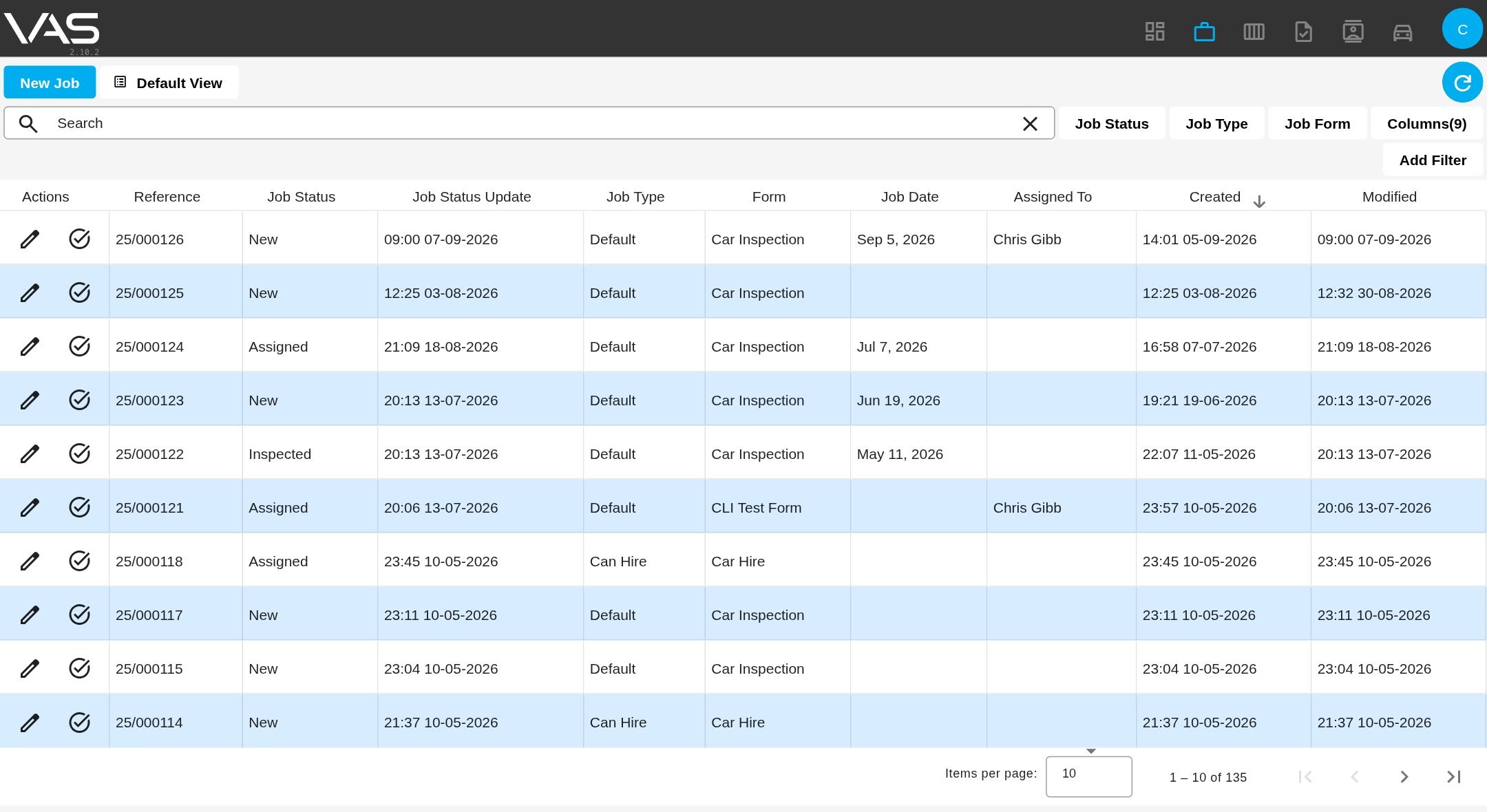
The VAS jobs table with a saved view, status and type filters, and columns chosen by the user

The jobs table in VAS: your statuses, your job types, your columns, saved as a view for everyone on the account.

Use cases

A job through VAS, for fourkinds of business.

Reports in minutes, not evenings.

The instruction arrives from an insurer through the portal, or is keyed in from an email. The registration lookup fills make, model, colour, VIN and MOT status.

On site, you photograph the vehicle, mark the damage on the diagram and dictate findings into rich-text fields backed by your own reusable comments.

Back at the desk, the Audatex estimate PDF is dropped on the job and becomes a costs table. One click generates the report from your Word template and emails it to the instructor. The fee control records fee, expenses and VAT for invoicing.
Registration lookupSplat diagramImage managerReusable commentsEstimate importWord-template reportsFee control
Book a demo
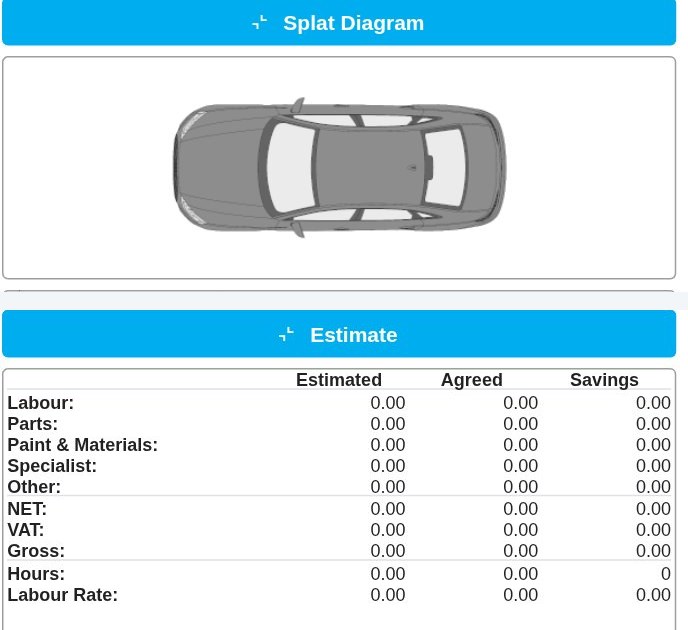
A VAS job form showing the damage diagram and the estimate table
On the job form: the damage diagram and the estimate totals, side by side with the inspection fields.

Customer portal

Give your customers a window into every job, without giving them your inbox.

The portal is optional, and plenty of businesses start without it. When you are ready, it lets the people who send you work submit it, track it and talk to you about it, on a form you designed.

  1. You design the intake form

    Create an instruction provider, pick the form it uses, and choose which fields the customer fills in and which appear in their tracking table. Pre-set defaults per provider.

  2. You invite your customer

    An invite link lets an existing user join or a new one sign up, with Google and Microsoft sign-in. A provider can be enabled but hidden when submissions should only come through job actions.

  3. They submit an instruction

    Registration, reference, photos and documents come in through the form, with required-field checks before submit. VAS creates the job and notifies whoever your rules say.

  4. They track it

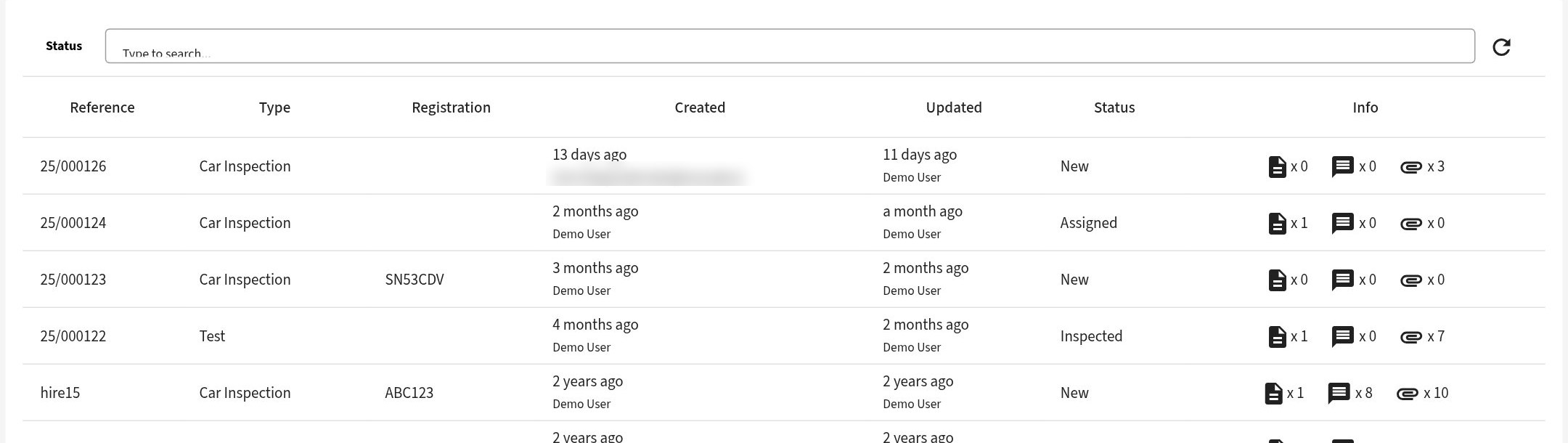
    Their table shows every instruction they sent, searchable by registration or reference and filterable by status. Each one opens to its files and a two-way notes thread.

  5. The report lands

    When the job is done, the generated report is there for them in the portal. No chasing, no attachments lost in email.

Work can still be keyed in directly, copied from a similar job or arrive by email. The portal is one more door into the same system.

The portal tracking table with status filter, search and per-instruction counts of files, notes and reports

What your customer sees: their instructions, with status, files, notes and reports at a glance.

The VAS job toolbar: save, clone job, new task, new email, new report, upload files, file manager, and status counts

What you see: the same job in VAS, with every action one click away.

"Where's my report?" becomes a question nobody has to ask.

Everything else VAS does

The features people ask about, in one place.

Word-template reports

Any document, letter or report you send today becomes a template. VAS fills it from the job and produces the PDF.

Custom forms

Around 30 control types with validation, defaults and grouping. Grid or slides layout for the tablet.

Reusable comments & variables

A library of text snippets a click away, and any field able to reuse the value of any other.

Image manager & damage diagram

Drag-and-drop photos, rotate and annotate, preview as they will appear in the report. Mark damage on a splat diagram.

Estimate import

Audatex, Glassmatix, GT Motive and iBody estimates read from the PDF into a costs table.

Vehicle lookups

Registration to make, model, colour, VIN, MOT status and history. DVLA and MOT history in the UK, RegCheck in Australia.

Job actions

One click runs a sequence: prompt for fields, send a templated email, set the status, stamp a date, call a webhook.

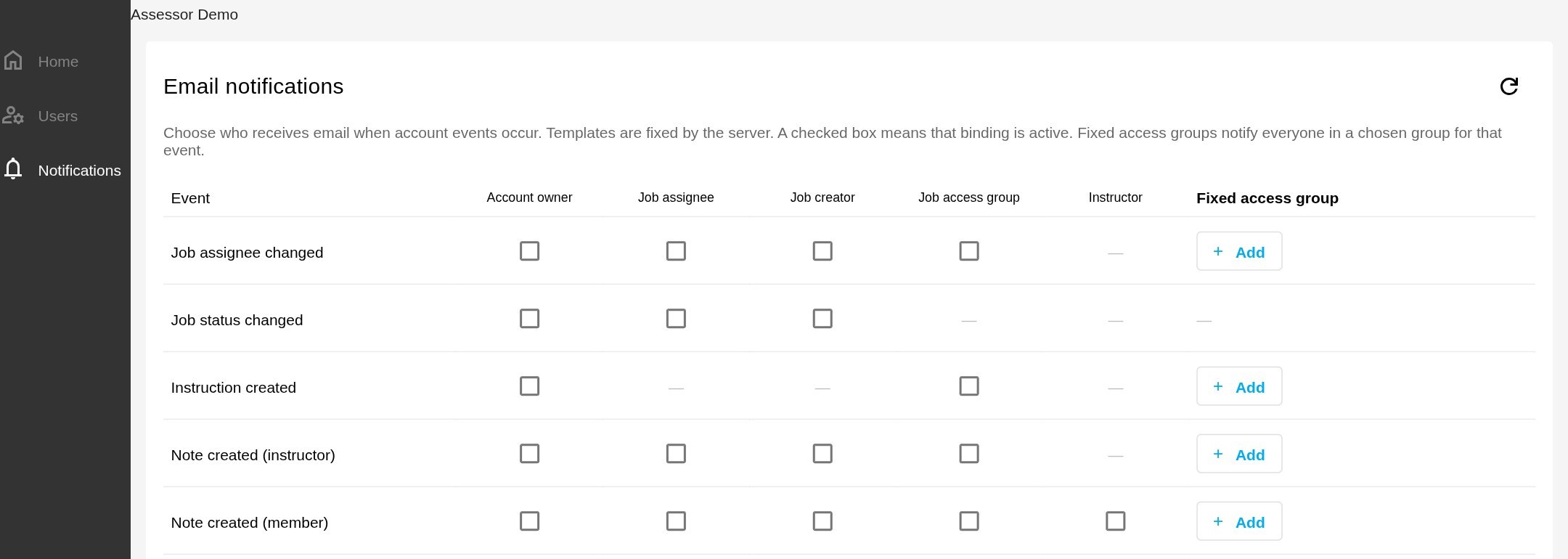
Notification rules

Choose who is emailed when a job is assigned, its status changes, an instruction arrives or a note is added.

Dashboard & schedule

Tasks due today, this week and overdue, per engineer. A calendar of jobs for the week ahead.

Contacts & fleet

Contacts by type, vehicles with their history. Linkable fields tie related jobs together automatically.

Exports & analytics

CSV exports by date and form for invoicing, and an analytics index for the numbers behind the business.

Audit trail & history

Who changed what, and when, on every job. Version control keeps two people from overwriting each other.

Integrations

Data is pulled in. Nobody re-keys it.

The systems assessors already use, connected so the information lands on the job as data, not as an attachment someone has to type up.

SourceWhat VAS pulls inWhat you stop doing
Audatex, Glassmatix, GT Motive, iBody Estimate systemsThe estimate PDF, dropped on the job, becomes a costs table: labour, parts, paint, specialist, totals.Re-keying forty lines of an estimate into a report.
DVLA and MOT history United KingdomMake, model, colour, engine, MOT status and full test history from the registration. Saved as a PDF report if you want one.Looking each vehicle up by hand and copying the details across.
RegCheck Australia, by stateVehicle details from the registration, straight into the job's vehicle fields.Typing what the registration already tells you.
Glass's Market Value Assessor Valuations and assessmentsValuations, quote assessments and total-loss figures land in the job as data.Reading numbers off one screen and typing them into another.
Google and Microsoft Sign-inYour team and your customers sign in with the accounts they already have.Managing another set of passwords.
Webhooks and n8n AutomationEvery change on a job can be pushed to your automation platform, so accounting and other tools stay in step.Copying job details into the tools that need them.

Every integration is switched on per account, so you see only the ones your business uses.

Proof

Built with the industry for more than ten years.

VAS is the result of engineers, assessors and repairers working with software people over a decade, so it fits the job rather than the other way round.

I used Word for my reports, now I have a system that works exactly the way I need it.

Carlisle C Bruce Engineer

VAS has saved me countless hours of manually writing reports and reduced my admin greatly.

Tony Dunphy Engineer

VAS has given me more time on inspections because the reporting process is so easy.

Daniel Buller Engineer
10+ years in the field4 markets: UK, Ireland, Australia, New Zealand5 platforms: Windows, Mac, Linux, Android, iOS

Book a demo

See VAS running on your kind of work.

Pick a time and we will walk through a job the way your business would run it, on your forms and your report template if you send one ahead.

  • Thirty minutes, online, no preparation needed
  • Your use case: assessor, firm, insurer, repairer or fleet
  • Your questions on data capture, workflow, reports and integrations

Booking calendar

The booking calendar loads here so you can pick a slot without leaving the page.

Open the booking page